LiveQuartz Image Editor

LiveQuartz Image Editor
License:
Free
Language:
English
Developer:
Developer's website
OS:
Mac OS X
Updated:
See detailed info

Softonic review

Cyril Roger

“A powerful free image editor”

by Cyril Roger about LiveQuartz Image Editor

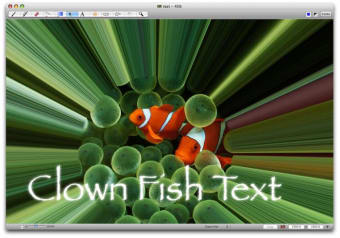
A simple, yet effective image editor, LiveQuartz sports a very nice window layout, which gives you easy access to layers and filters, whilst offering you other editing options.

Use the top menu bar to draw lines, add text or shapes. From the left of the interface you can add and preview as many layers as you want. The right is reserved for filters, and LiveQuartz offers an impressive amount of them.

You can easily add as many as you need and remove them in a click.

LiveQuartz seems to focus more on filters and layers at the expense of other editing tools.

These are pretty limited and will only carry out basic functions. We also found that the layer controls, , because of their size, can be a bit difficult to manipulate.

LiveQuartz is a nice free image editor, especially if you're interested in filters and layers, but don't count on it to extensively edit images.

Pros
  • Great window layout
  • Easy to add layers and filters
Cons
  • Limited editing functions
  • Layer controls are too small
Free Download LiveQuartz Image Editor 1.9

LiveQuartz Image Editor is virus free

We have analyzed the latest version of LiveQuartz Image Editor with 30 antivirus engines and it is virus free. See analysis results.

TESTED VIRUS FREE - Softonic GUARANTEED

Developer's description

LiveQuartz is a powerful free image editor. It is based on layers and CoreImage filters. You have the layers on the left and the filters on the right of the window.

(An alternate user interface with settings in a drawer is also available via preferences). To edit an image, just drag it into the window (or layers' list at the desired position) and it will be added as a new layer.

Review and rate LiveQuartz Image Editor

Your avatar

Your opinion is important.
Help other users - be the first to review this program.

Review
  1. Maximum: 75 characters

  2. See example

Pros and Cons
Rate
  1. What rating would you give LiveQuartz Image Editor?

    You need to fill in all fields

    • Usability:

      Not rated
    • Stability:

      Not rated
    • Installation:

      Not rated
    • Functionality:

      Not rated
    • Appearance:

      Not rated
    • Overall rating:

      Not rated
  2. Don't worry, we won't make your email address public.

You're not allowed to share serial numbers, cracks, etc. or link to pages that contain them. If you do, your user account will be deleted, your IP address logged and legal action will be taken.

Get started - just ask a question!

Write a title for your question.

Alternativesto LiveQuartz Image Editor

  • In English:
    Paintbrush
    Paintbrush

    The closest thing to Paint for Mac

    Softonic rating:
    • 7/10
    User rating:
    • 5/10
  • Better rating:
    Pixen
    Pixen

    Hone your pixelling skills

    Softonic rating:
    • 8/10
    User rating:
    • 8/10
Compare with LiveQuartz Image Editor

Screenshots from LiveQuartz Image Editor

Download rank: Graphics Editors

52 of 71

Softonic rating:
  • Good
  • 7/10
Your rating:
Your rating
  • 0

Review and rate this program

Top Downloads: Graphics Editors

  • United States
  • Global

  1. Paintbrush

    The closest thing to Paint for Mac

  2. The GIMP
  3. Adobe Illustrator CS5
  4. Adobe Photoshop Update
  5. myPhotoEdit